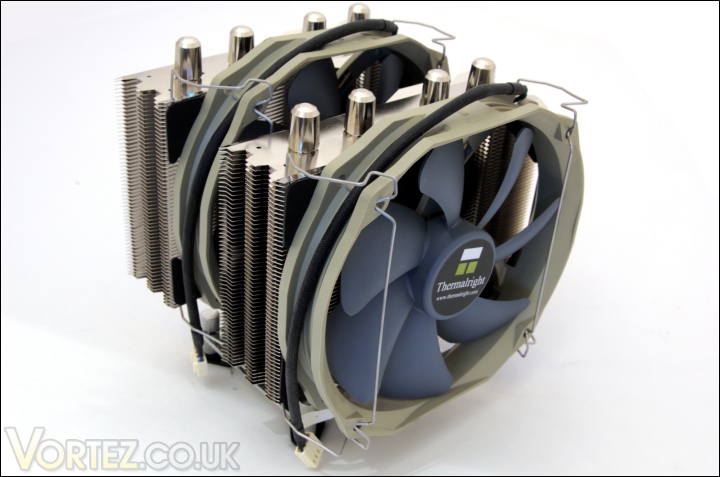
Thermalright have announced their latest flagship multi-platform dual radiator cooler so let’s see how it stacks up against its rivals.
Product on Review : Thermalright Silver Arrow
Manufacturer and Sponsor : Thermalright
MSRP : Not mentioned on site
Street Price : £54.04
Thermalright are no strangers to dual radiator tower heatsinks. In fact they were one of the first to introduce the concept with their famous IFX-14 cooler. Although it never received as much attention as the much revered Ultra 120 Extreme, the IFX-14 was a revolutionary design that allowed users to attach up to three fans of varying thicknesses (25mm/38mm) so it proved highly efficient for brute air cooling performance. However, the Ultra 120 Extreme has now been succeeded by the superior Venomous X, which proved to be one of the best coolers we have tested here at Vortez, so it’s now the IFX-14’s turn to undergo the same treatment. The result is the Thermalright Silver Arrow.
Some of you may notice that the Silver Arrow is reminiscent of the Cogage Arrow and that’s because the latter was designed by the same engineer team. Cogage is a budget oriented company that falls under the umbrella of its parent company, Thermalright. That’s not to say that the Silver Arrow is a direct copy of the Cogage solution because it has undergone several refinements to deliver a highly polished product that is deserving of its Thermalright heritage. The most significant difference is the inclusion of Thermalright’s latest TR TY-140 fans but more on that later.

Before we go onto the rest of the review, there’s a certain other cooler I have to mention, the Noctua NH-D14. Noctua’s flagship cooler is currently top of our charts and so far only the Venomous X has come close to matching it. Since the Silver Arrow sports a similar design, we can expect it to be an excellent performer. Whether it will finally take the crown from Noctua’s long reign remains to be seen…
A few words from Thermalright
Let’s move on to the next page for a closer look.
Feature and Specifications
•4x8mm sintered heat pipes effectively take away excessive heat from the CPU when overclocked
•Nickel plated heat pipes for slower oxidation and deterioration, and for longer period of thermal conductivity
•Double fin design, each side with 147x103mm heat dissipation area, can be used with 12 or 14cm fans (fan clips included)
•Special Arrow fin design, which allows cool air to pass through and take heat away rapidly, effectively providing cooling for the CPU
•Multi-platform support. Can be used on Intel Socket 1366/1156/775 and AMD socket AM2/AM3
•Includes two 160x140mm Ultra low noise PWM fans. With compatibility of up to 3 fans at a time
•Comes bundled with Thermalright Chill Factor III thermal paste.
Specifications
•Cooler dimensions: 147x123x160mm (LxWxH)
•Cooler weight: 825g (excluding mounting bracket and fan)
•Heat pipe: 8mm Sintered Heat pipes x4 units
•Cooler base material: C1100 Pure Copper with Nickel plating
TR TY-140 Fan Features
•PWM fan provides simple and easy adjustment of fan speed with the latest ETC IC
•Seven Silent Torpedo Blades – “submerges”. Gives most quiet and efficient airflow
•Enhanced Hyper-Flow Bearing (EHFB) – to ensure consistent and stable RPM, prolonged lifetime of usage
•Aerodynamic body – less friction around the edges and give more centred and concentrated flow
•12cm mounting hole – allow installation on the 12cm dimension, so will be compatible with most cooler without having the need to buy extra kit for 14cm fan.
TR TY-140 Fan Specifications
•Fan dimension: Length 160x140x26.5mm (LxHxW)
•Fan weight: 140g
•Fan speed: 900-1300RPM (PWM)
•Fan noise level: 19-21dBA
•Fan Airflow: 56-73CFM
The Thermalright Silver Arrow certainly boasts some very impressive features and specifications. In terms of construction, it’s very similar to the Thermalright Venomous X. Both use the same sintered heat pipes, aluminium fin construction, all copper base and nickel plating. However, the difference is that the Silver Arrow uses four 8mm heat pipes as opposed to six 6mm ones. Thermalright are also accustomed to making their base slightly convex to accommodate the overall finish of a CPU HIS and the Silver Arrow is no exception, although this isn’t very noticeable without careful observation. Another similarity to the Venomous X is how the fins are specially designed at an angle to increase airflow efficiency. It’s a design that has been highly effective in all Thermalright coolers so it’s no surprise to see it here. Unlike the Venomous X we tested, the Silver Arrow has more content bundled such as two 140mm fans, and compatibility on all modern motherboard, including AMD sockets. This is a very welcomed addition for a more complete package.
Compared to the Noctua NH-D14, the Silver Arrow is less deep but slightly wider. Although both use the dual radiator design, there are many features that differentiates them, making both very unique products. Firstly, the Thermalright uses 8mm heat pipes instead of 6mm ones and the angled fin design contrasts to the planar fin array of the Noctua. The much deeper Noctua has the advantage of a larger surface area but this prevents 38mm fans from being supported like they are on the Silver Arrow. It also means that the latter can accommodate up to three fans more easily without being too close to the rear exhaust fan inside cases. One of the key differences is that the Silver Arrow bundles two 140mm fans instead of the 120/140mm fan configuration used on the Noctua. We will have a much closer look over the next few pages.
Packaging and Content
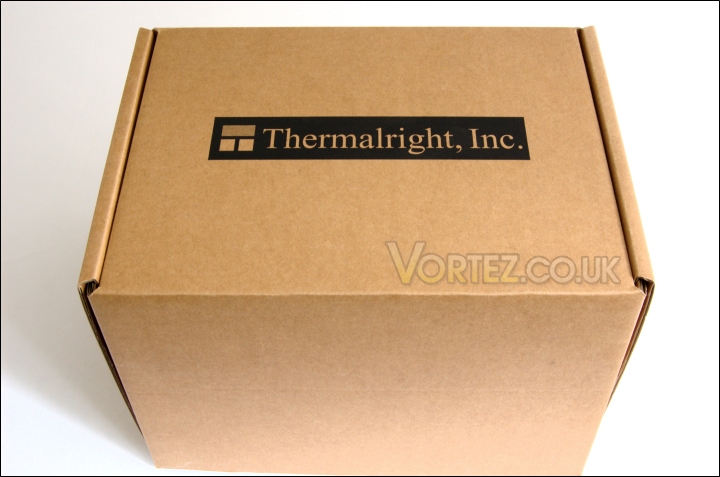
The front of the box
The packaging is very striking on initial view, not because of its plain understated look but because of its sheer size. It’s no surprise considering the content. The box is a basic brown cardboard box, as traditionally employed by Thermalright for all its products. Apart from the Thermalright logo, the company have opted out of using vibrant graphic arts, no doubt to lower costs. My only complaint is the lack of a specifications table or feature list, but given that most sales would be online, it is understandable.
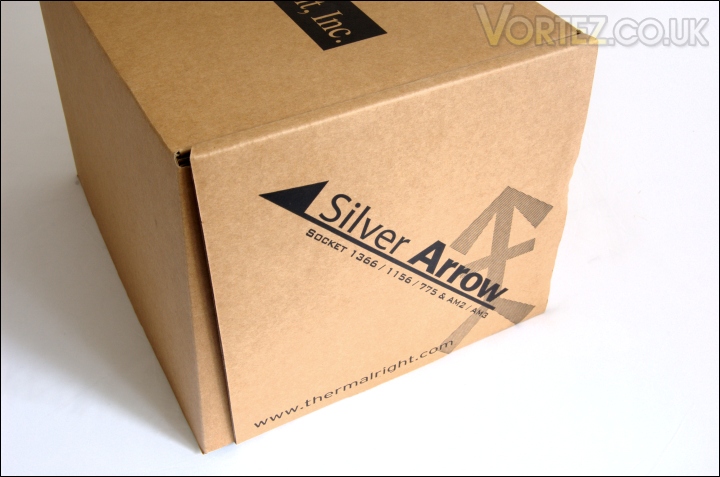
The Silver Arrow logo
The only other printed label can be found on the side where the Silver Arrow name can be found in bold. Accompanying this is a the Thermalright website and a list of sockets the cooler is compatible with.
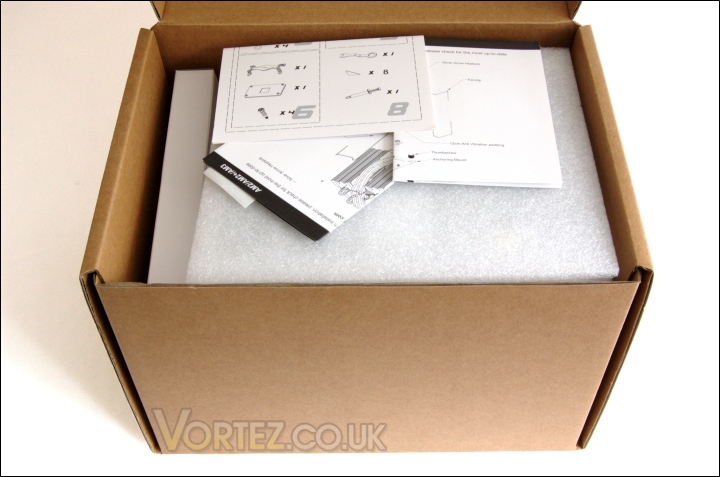
Opening the box
Upon opening the box, we are greeted with a few leaflets detailing the bundle content and the installation procedure for both Intel and AMD systems. There’s also a Thermalright sticker included.
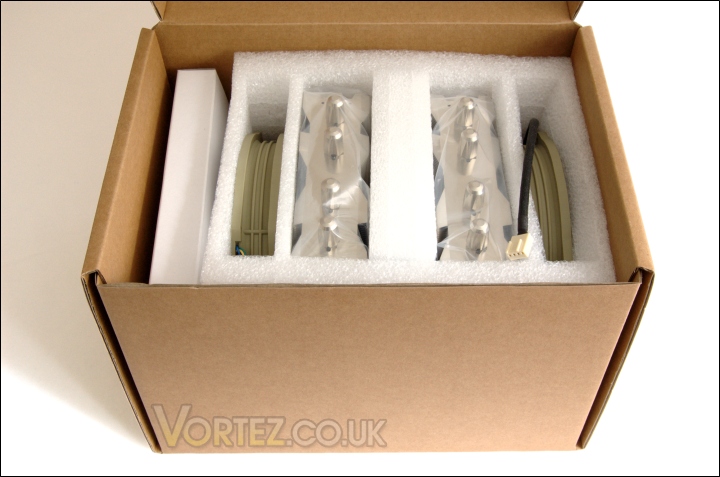
Closer look at the inside
Looking closer, we can see that Thermalright use a lot of foam to enclose the content. These ensure that the product is safe during transit and doesn’t get damaged. The middle two compartments of the enclosure house the dual fin cooler while the outer compartments hold the fans. On the left hand side is a small clearing for the accessories box.
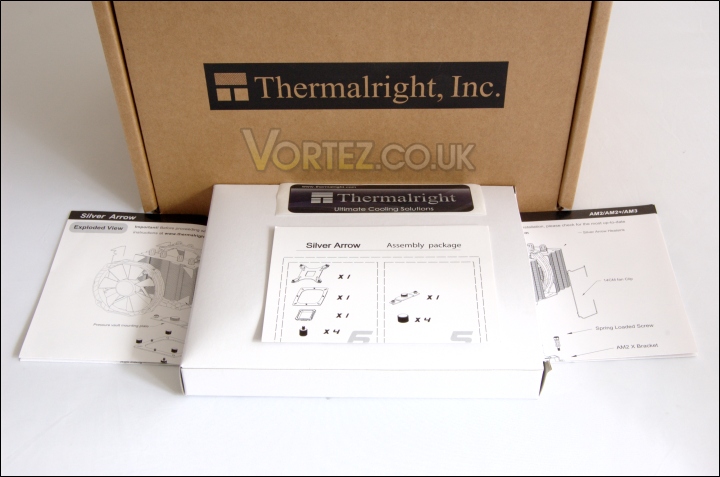
The assembly package and leaflets
With the content laid out, we can see the three documentation leaflets for the assembly package and AMD/Intel installation guides, and the white accessories box.
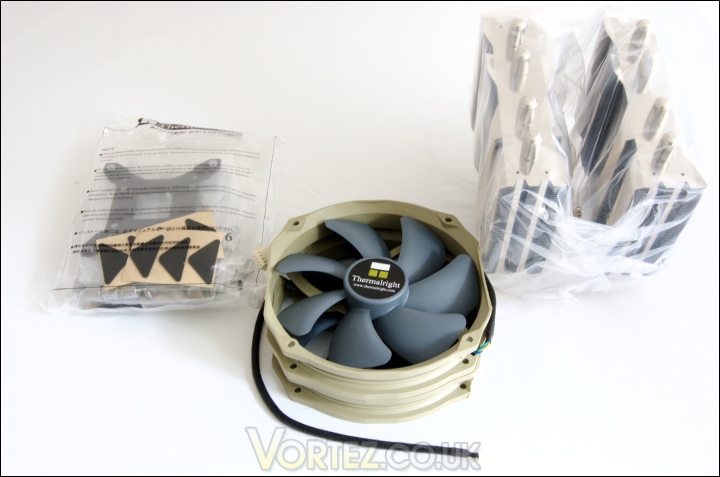
The content
Also included is the heatsink itself neatly wrapped in a plastic cover, the two TR TY-140 fans and the accessories in another plastic pocket. The fans are very unique in their design, sporting an interesting military green and blue colour scheme. Unlike the circular shape of the Noctua NF-P14 fan, the TR TY-140 doesn’t adhere to a regular shape. Instead it has a 160x140mm dimension whereby two opposite sides are straight and the other two are semi-circular. The fan fittings are the same as 120mm fans to ensure compatibility with other coolers or cases. Users have to be aware that the actual fan dimensions may restrict installation in some situations. It would have been welcoming to see some brackets for 140mm fan fittings given that the fans have very good specifications. The seven bladed fan uses a propeller design to maximise airflow whilst reducing noise levels. Thanks to PWM functionality, they can operate between 900 and 1300RPM. The braided cable is an excellent finishing touch that adds class to the product.
Closer Look
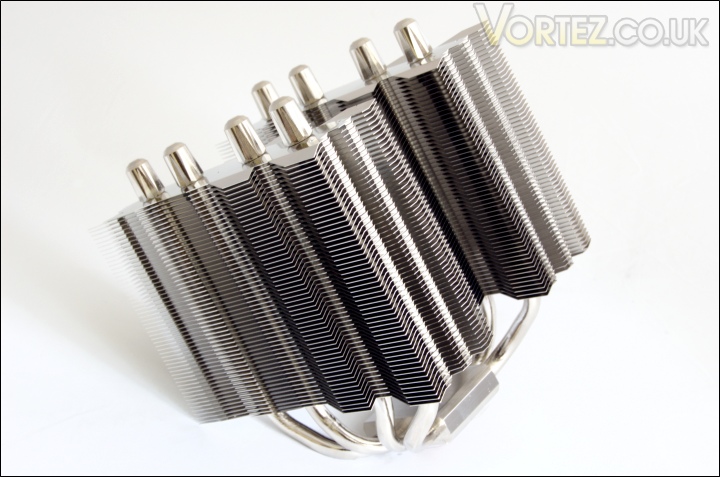
The heatsink laid bare
The Thermalright Silver Arrow is a very attractive yet mammoth like in size. The first thing that struck me was how reflective it was thanks to a perfect nickel plated finish. it boasts quality and class with every detail carefully specified to perfection. If we had an award for most aesthetically pleasing cooler, then the Silver Arrow would no doubt earn it. Ample protection from the packaging means that there are no out of shape fins.
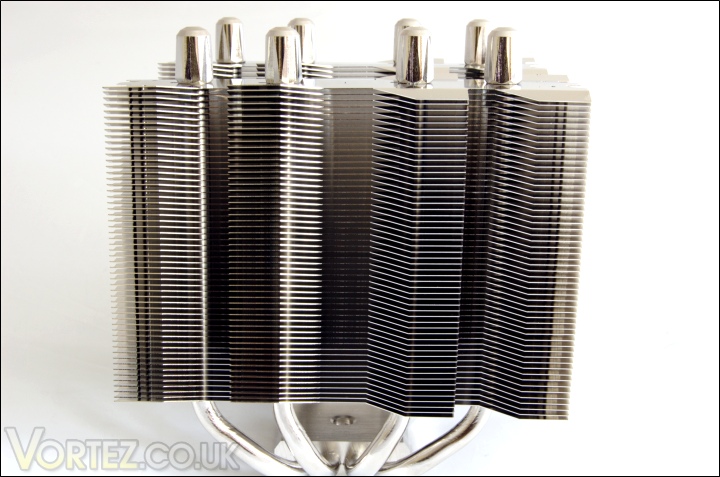
The radiator fin array
Facing the front of the cooler, we can see the first fin array. In total, there are 55 fins to create a very dense heatsink so a fan with high static pressure is advisable. Thankfully, Thermalright saves users the trouble by bundling their own TR TY-140 fans. The fins are nickel plated aluminium plates stacked up in parallel above each other. The most notable feature is the shape of the individual fins. Each is rectangular with 4 arrow shaped protrusion on either side of the heatsink. The special Arrow fins are angled just like on previous Thermalright coolers to create a more turbulent flow for higher heat transfer. This is one advantage the Thermalright has over the planar design of the Noctua NH-D14. Each fin has an approximate surface area of 5145mm2 which over the total of 110 fins provides a very large area for heat dissipation.
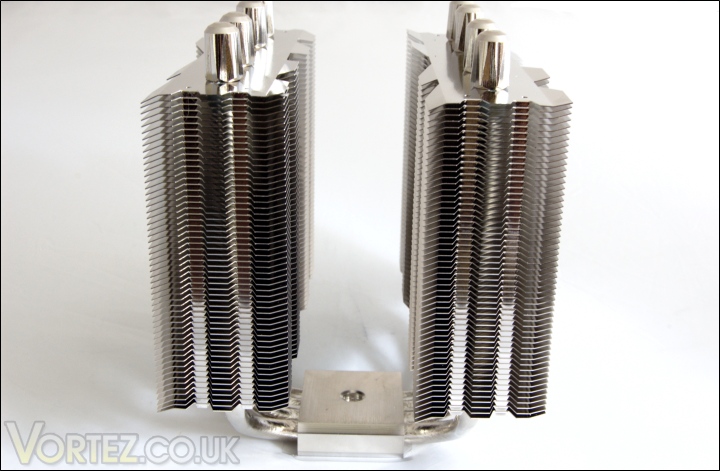
The side profile of the dual fin array
Looking at the side, the bent fins become more apparent. Each fin stack is 4.2cm wide compared to the 5cm width of the Noctua’s radiators. The main benefit of using the narrower heatsink is to create a larger 3.8cm gap in the centre to accommodate thicker fans such as Deltas or San Ace. Down the sides of each radiator are two narrow grooves where the fins have been closed off, most likely to help direct the airflow through the cooler rather than to the side.
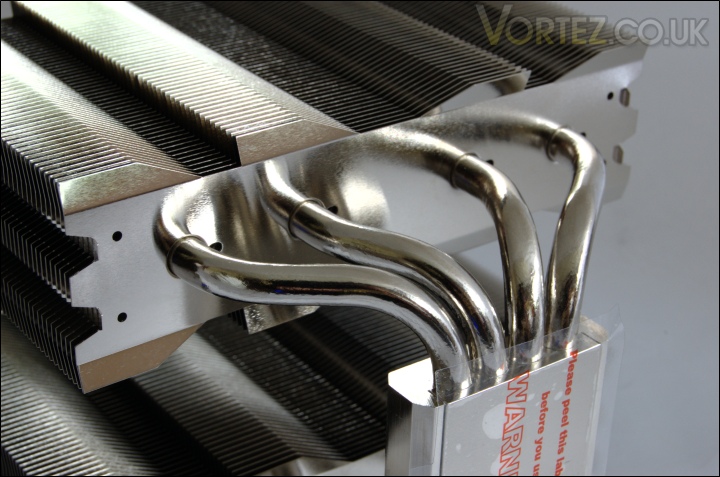
Four 8mm heat pipes
The Silver Arrow differentiates itself from the Venomous X and Noctua cooler with its four 8mm thick heat pipes. The sintered heat pipes help to transfer heat from the base more effectively than narrower heat pipes and the construction ensures longevity against the elements. The heat pipes are in direct with the copper base and spread out with each end going through a separate heatsink to cover a greater surface area.
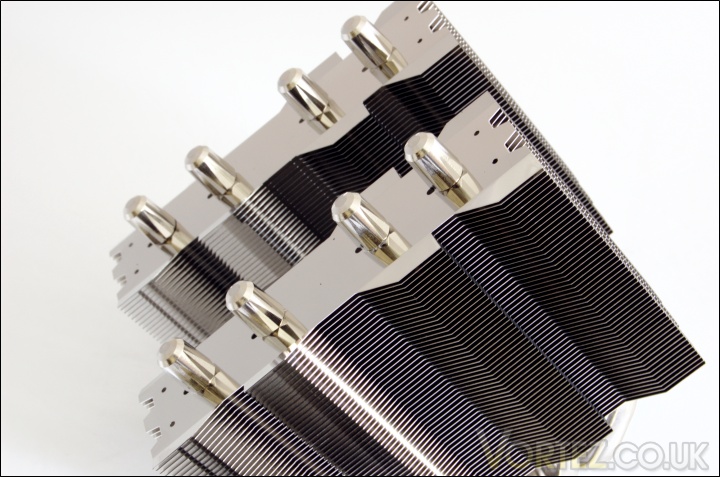
The top of the heat pipes
At the top, we can see how the heat pipes are configured. Each radiator holds 4 heat pipes that are spread linearly so each can dissipate over a bigger area across the fin. Thermalright have done a tremendous job finishing off the cooler with meticulously sculptured heat pipe ends, a nice touch that many high end coolers lack. From the top, we can also see two tiny holes on each side of the radiators where the fan clips install.
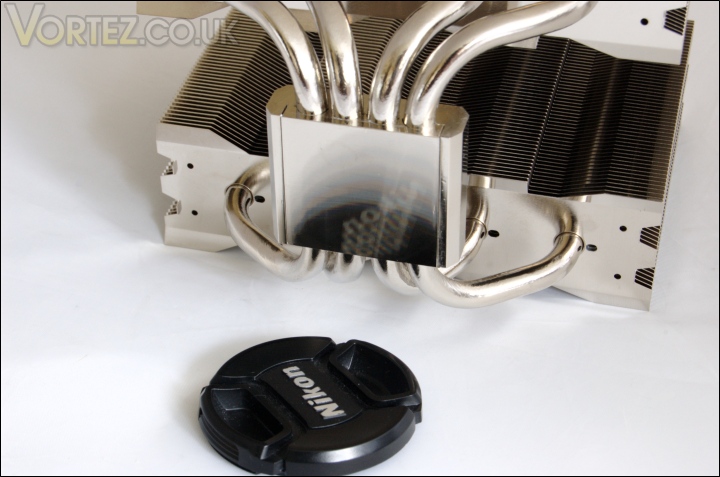
The base of the heatsink
The copper base is fairly flat and smooth but lacks a perfect mirror finish like the Venomous X had. In true Thermalright fashion, the base is slightly convex to match the shape of CPU integrated heat spreaders. After installing the cooler, I noticed that it did an excellent job of spreading the thermal paste evenly by simply applying pressure on top of a rice size amount of compound.
Closer Look (Continued)
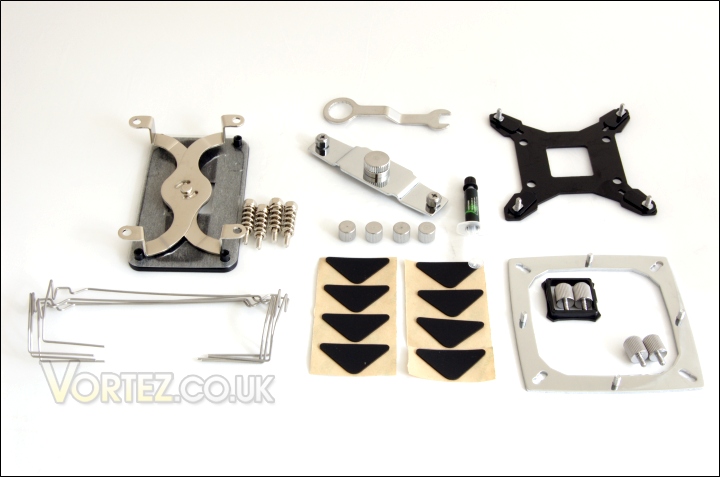
The installation kit
One of the key aspects of the Thermalright Silver Arrow is its compatibility with both Intel and AMD systems. Included in the mounting kit are the:
– multiple support backplate for Intel (Intel)
– AM2 backplate (AMD)
– Insulated washers x4 (Intel)
– anchoring mount (Intel)
– AM2 X bracket (AMD)
– pressure vault mounting plate (Intel)
– screw pillars x4 (Intel)
– thumbscrews x4 (Intel)
– backplate cap for Socket 775 (Intel)
– Spring loaded screws x4 (AMD)
– angled wrench
– fan clips x4
– anti vibration padding x8
– Thermalright Chill Factor III Thermal paste
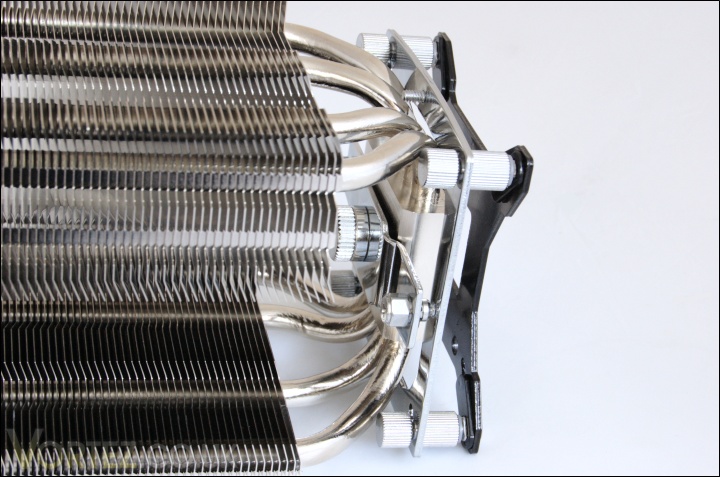
Installing the mounting bracket
Installation is a very easy process for both Intel and AMD setups. While AMD systems make use of a universal motherboard backplate, the Intel one uses a unique system to change its compatibility for different sockets. Each corner has three notches for LGA 775/1156/1366 into which the screws can slide into. After placing the backplate behind the motherboard, the screws have to be installed at the front to secure it. Detailed instructions on how to install the heatsink can be found on Thermalright’s website for both Intel and AMD platforms. Also note that the Intel mounting kit includes a pressure vault mounting plate so users can adjust between 40lbs to 70lbs of pressure being applied.

The Thermalright Silver Arrow + 2x TR TY-140 fans
And finally we have the Thermalright Silver Arrow with both fans attached. The size of the fan ensures that airflow covers the whole heatsink. The irregular shape also means that users have to be aware which way to mount the fans and ideally the flat areas of the frame have to be at the top and bottom for greater clearance above the RAM modules. Unfortunately the braided cable is only 26cm (the NF-14 cable is 40cm long) so make sure the fan is oriented closely to a fan header. The fan clips have been designed to support both 120mm and 140mm fans mounts so greater compatibility is offered.
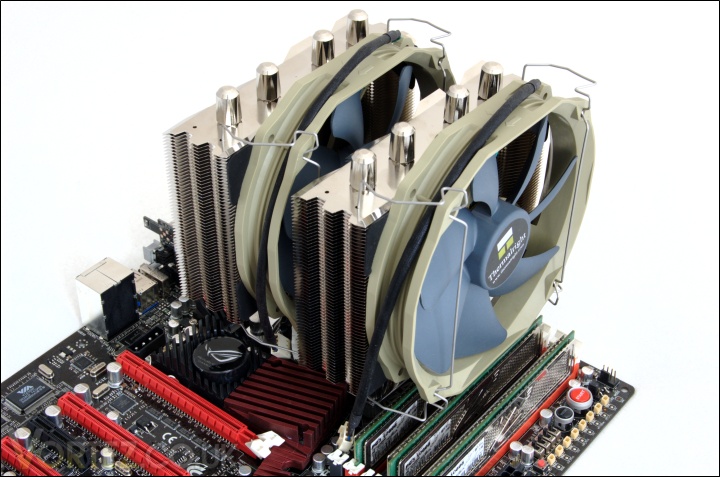
Installed
When installed, we can see that the Thermalright Silver Arrow is a beast! It spans a great length of the top of the motherboard but thankfully doesn’t come into conflict with any chipset cooling. Another note for ease of installation is to install the fan clips before install the heatsink onto the motherboard or else access to the mounting holes become restricted.
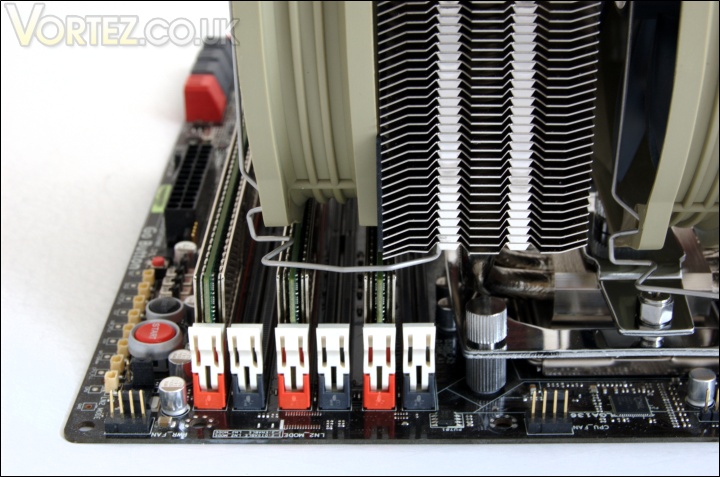
Memory module clearance
Taking a closer look at the clearance above the memory modules, it’s clear that those with larger heat spreaders will not fit. The front heatsink covers the nearest DIMM slot and with the fan attached, 4 of the slots are covered, similarly to the NH-D14. Unlike the latter though, the front fan cannot be moved up to make provisions for large modules. To alleviate the problem, the front fan can always be moved to the back of the cooler. The middle fan also does a good job at cooling the surrounding motherboard VRMs thanks to the angled heatsink fins but the pressure vault bracket prevents it from sitting lower.
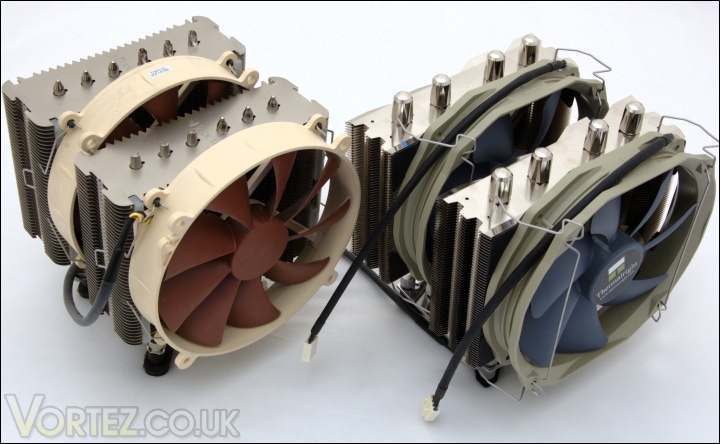
Noctua NH-D14 VS Thermalright Silver Arrow
For good measure, I thought I’d put the two behemoths side by side for comparison. The question is, which one will top our chart?
Comparison Shots
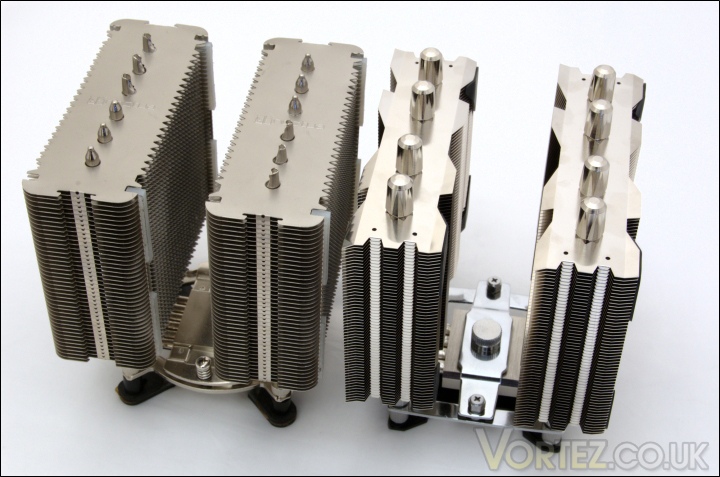
Noctua NH-D14 VS Thermalright Silver Arrow heatsink
The Silver Arrow heatsink is slightly wider than the Noctua at 147mm across instead of 140mm in the latter’s case.
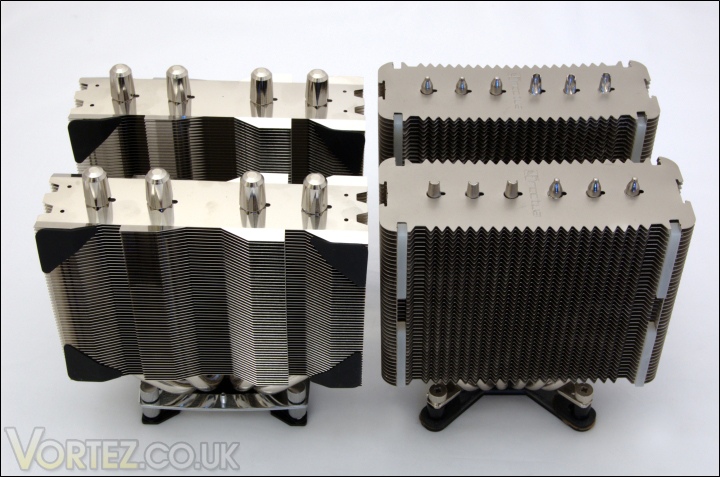
Noctua NH-D14 VS Thermalright Silver Arrow heatsink front view
In terms of depth, the Silver Arrow is 123mm, 7mm less than the Noctua. The height of both coolers are the same.
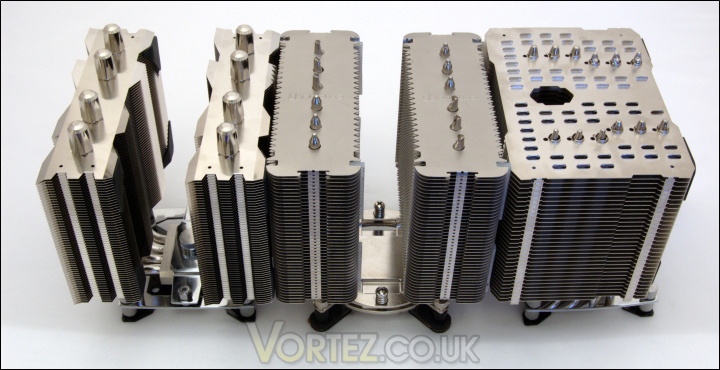
Thermalright Silver Arrow VS Noctua NH-D14 VS Thermalright HR-02
If two beasts weren’t enough, Thermalright also sent their HR-02 which we will cover in-depth soon.
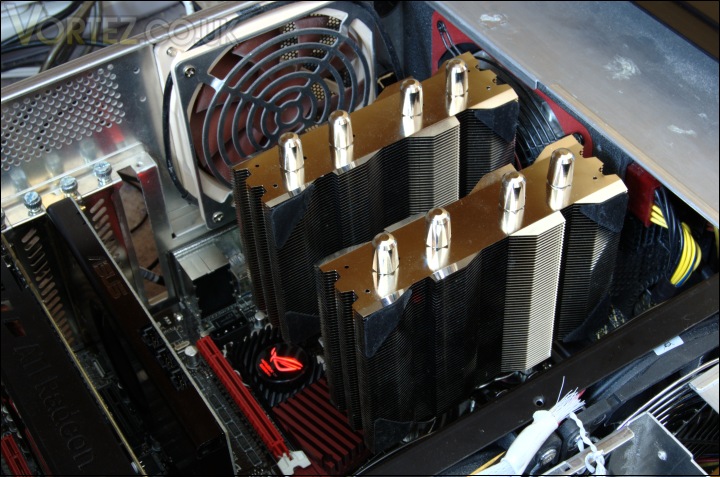
Installed inside a case
All the tests conducted at Vortez are done inside a case to simulate real world conditions so this is how the Silver Arrow would look in a typical mid-tower system.
Test Setup
RAM – 6GB (3x2GB) OCZ platinum DDR3 1333MHz
Motherboard – ASUS Rampage III Extreme
Graphics card – XFX HD5870 1024MB
Power Supply – Enermax Revolution 85+ 850W
Hard Drive – Samsung F1 320GB
Western Digital Caviar WD3200AAKS 320GB
Drivers – ATI Catalyst 10.5
CPU Coolers:
Thermalright Silver Arrow including passive and tests using 2 Noctua NF-P12s and 2 SWiF2-120Ps
Thermalright HR-02 including passive and tests using Noctua NF-12/NF-P14s and Thermalright TR TY-140
Thermaltake Frio (Low/med/high speed) including tests using 2 Noctua NF-P12s
Corsair H50 including tests using 2 Noctua NF-P12s and 2 SWiF2-120Ps
CoolIT ECO A.L.C including tests using 2 Noctua NF-P12s and 2 SWiF2-120Ps
Thermalright Venomous X using 2 Noctua NF-P12s and 2 SWiF2-120Ps
Coolink Corator DS including tests with dual fan setups
Tuniq Propeller 120(High speed fan)
Noctua NH-C12P SE14
Prolimatech Megahalem
Noctua NH-D14 (U.L.N.A and default speed)
Noctua NH-U12P SE1366
Thermolab Baram (with 2 Noctua NF-P12 fans)
CoolIT Domino A.L.C
Sunbeam Core Contact Freezer
Coolermaster Hyper 212 Plus including test with 2 Noctua NF-P12 fans
Alpenföhn Nordwand including test with 2 Noctua NF-P12 fans
Tuniq Tower 120 Extreme (Low/med/high speed)
Program Suite:
Core Temp 0.99.5
LinX stress Test
PC Wizard
CPUID HWMonitor
How I tested:
Testing will be based on temperatures recorded by Coretemp and PC wizard after 20 passes of LinX stress test. The absolute temperatures recorded in the tables are averages of the 4 cores and the delta value provided for a fair comparison, taking into account ambient temperatures. The test will be run at stock speed and at an overclocked speed of 4GHz.
Although all coolers come with their own thermal paste, I will be using Thermalright’s Chill Factor II to get a better idea of actual cooler efficiency.
Results
Stock
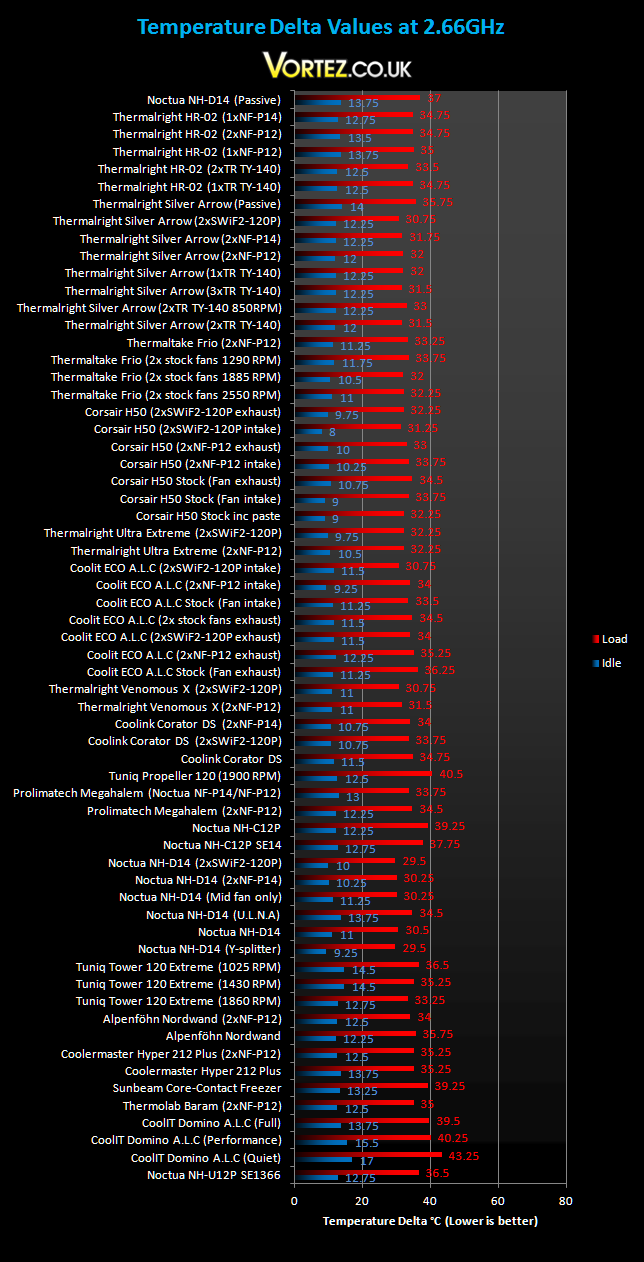
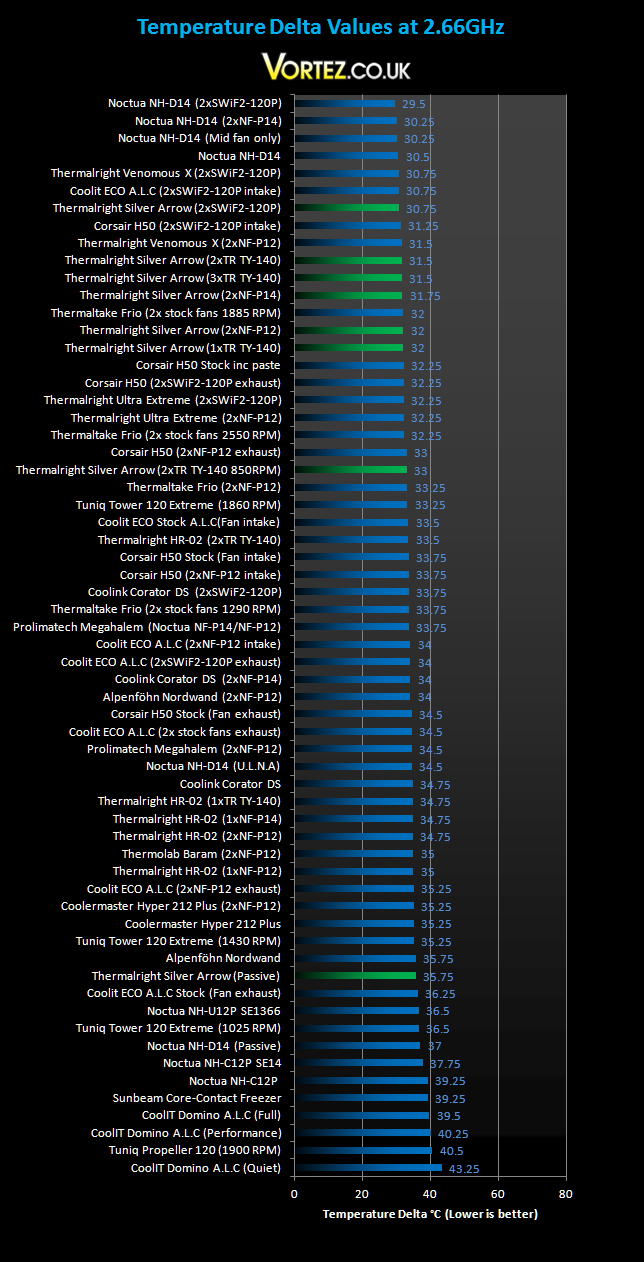
The Silver Arrow gets off to a flying start at stock speed but falls just shy of the Noctua NH-D14. Across the different fan configurations, there is very minimal change in performance. Not surprisingly, the best results is yielded by using the two SWiF2-120P fans operating at 1900RPM. The default Silver Arrow setup using the two TR TY-140 fans matches the Venomous X coupled with two Noctua NF-P12s, whereas when the former is used with those fans, its performance drops by 0.5C. It’s impressive to see the single fan configuration keeping up in performance while staying very quiet. Passively, the Silver Arrow outperforms the Noctua NH-D14 by 1.25C and the HR-02 by 2C. The outstanding fact is that it manages to cool as well as the Alpenföhn Nordwand and the Noctua NH-U12P which both feature extra fans. Idle temperatures were generally quite good but not class leading. However, we are more interesting in the load temperatures here.
Results (Overclocked)
4GHz
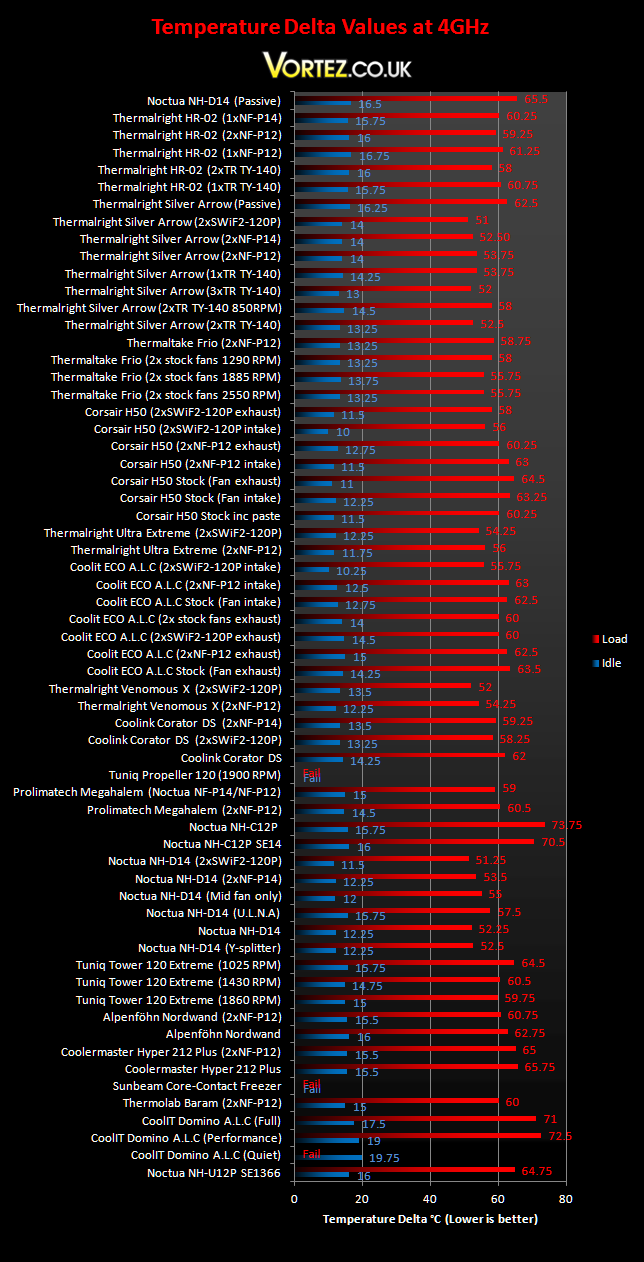
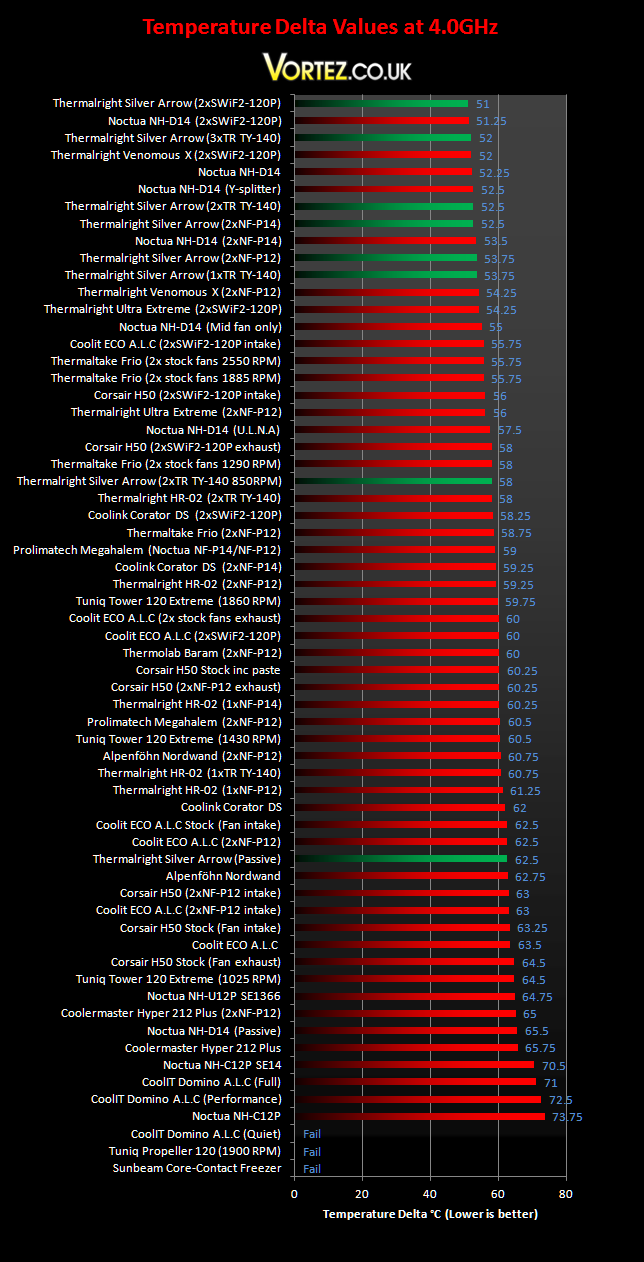
Most of you are probably more interested in the overclocked results so I will analyse the results here in more depth.
Stock configuration comparison
First of all, it’s not hard to see that the Thermalright Silver Arrow has topped the chart, an impressive feat considering the competition it’s up against. But let’s start by looking at the stock configuration. When teamed with the two bundled TR TY-140 fans, the Silver Arrow falls behind the stock Noctua NH-D14 by a mere 0.25C and when both use their own branded 140mm fans, the Silver Arrow outperforms the Noctua (2xNF-P14s) by 1C. With both running their stock fans at low RPM, the NH-D14 comes out top again by 0.5C. So users not looking to change the stock fans should definitely consider the Thermalright cooler as a viable alternative to the Noctua. Furthermore, Thermalright are pricing their cooler at around £10 less making it a bargain.
*Note: The Noctua NH-D14 was tested with Thermalright Chill Factor II thermal paste rather than the stock NT-H1 paste which is inferior. So unless users buy some aftermarket paste, the Silver Arrow will perform better straight out of the box thanks to the inclusion of the Chill Factor III thermal paste.*
Number of fans
Since the Silver Arrow can support up to 3 fans (only two sets of clips are provided), I thought it would be interesting to see how performance scales up with the number of fans. With a single TR TY-140 in the middle acting as both a push & pull fan, performance dropped by merely 1.25C compared to using two fans. Interestingly, with a delta value of 53.75C, the Silver Arrow performs better than the NH-D14 also sporting just a middle fan. Scaling with a third fan was less dramatic, only improving temperatures by 0.5C. Saying that, this setup is a much quieter solution to using the Coolink fans. For a last test, the Silver Arrow was installed passively and still yielded stunning results to match the likes of the CoolIT ECO, Corsair H50 and a range of other high end air coolers!
Heatsink efficiency
To measure the heatsink’s efficiency, several fan configurations were used for apple to apple comparisons with other heatsinks. Installing two Noctua NF-P12s and two Coolink SWiF2-120Ps, the Silver Arrow manages to outperform the Venomous X by 0.75C and 1C respectively. To compare against the Noctua NH-D14, we have to look at both using the Noctua NF-P14 and Coolink SWiF2-120P fans. The results show that in both situations the Silver Arrow comes out as the more efficient cooler, more so with the NF-P14s attached. This suggests that the Silver Arrow prefers the larger 140mm fans and further backing this up are the results showing the dual NF-P14 results bettering the NF-P12 results.
TR TY-140 VS Noctua NF-P14
140mm fans are becoming more mainstream nowadays so it’s worth investigating how those two stack up to each other. The results show that under load, both performed the same on the Silver Arrow but at idle the TR TY-140 has a 0.75C advantage. At stock clock speed, the Thermalright fan also has a slight lead.
Other Observations
Thermal paste comparison
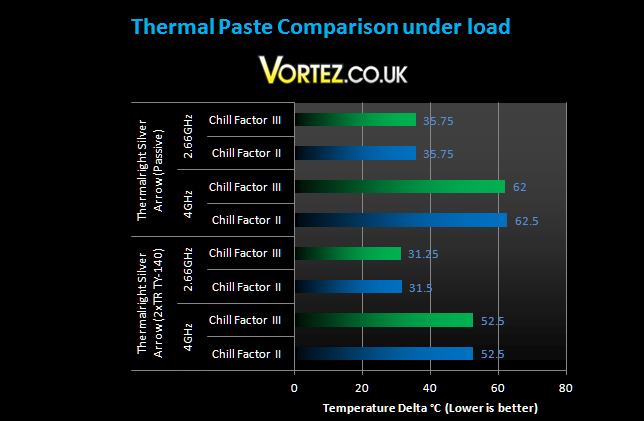
For all the cooler tests, I use Thermalright’s Chill Factor II thermal paste but since the Silver Arrow is bundled with their latest iteration, it would have been a shame not to see if the Chill Factor III could give it the advantage over the Noctua. Sadly, the new thermal paste didn’t provide a substantial performance gain. The only noticeable change was 0.5C at 4GHz, with the Silver Arrow installed passively.
Passive Result – 2.66GHz
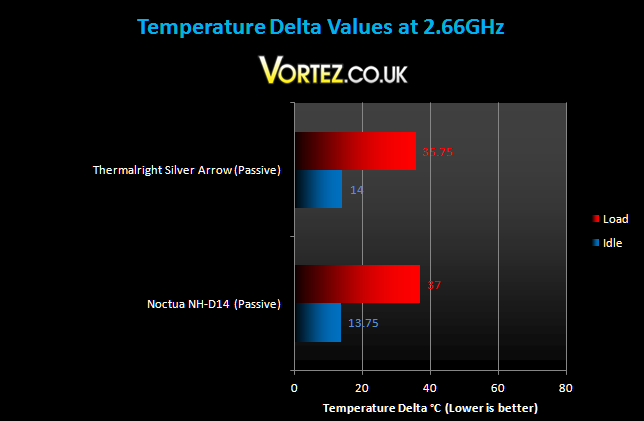
Passively, the Silver Arrow is an outstanding cooler. It handled the stock i7 920 easily and even when stressed for prolonged periods, the temperatures remained stable. Here, the Silver Arrow outperforms the NH-D14 by a healthy margin under load despite the 0.25C deficit at idle.
Passive Result – 4GHz
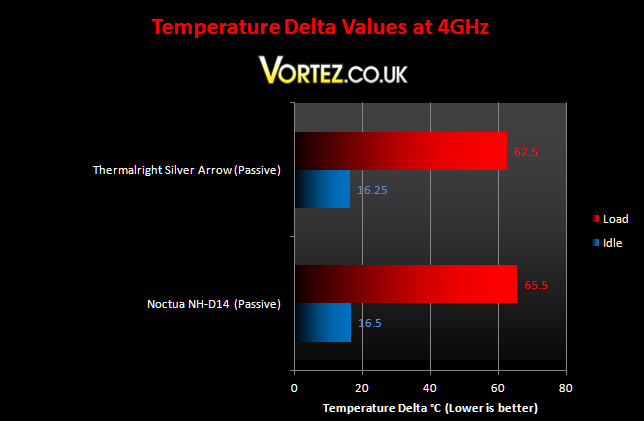
It’s an impressive feat seeing heatsinks passively cooling an i7, especially when it’s overclocked to 4GHz! Of course, having good airflow is of utmost importance but it certainly helps reduce noise levels whilst maintaining temperatures. Its lead over the Noctua NH-D14 was a stunning 3C.
*Thermalright HR-02 results have been omitted for now in light of further passive tests*
Noise
The main benefit of the bundled TR TY-140 fans is the low noise levels. They were generally inaudible above my other case fans at a speed of 1300RPM. Users can always decide to remove one fan to reduce noise or alternatively the fans have PWM functionality. Rather than using U.L.N.A adapters, as is the case for the Noctua fans, users can simply adjust the fan speed in accordance to CPU temperatures or loads. Overall the fans provide great airflow without sacrificing your hearing.
Conclusion
Thermalright have done it again! They have brought new life to their dual fin design to create a product that provides class leading performance, low noise levels, an appealing finish and ease of installation. The Silver Arrow represents a complete package to any users looking one of, if not the best, CPU air cooler out there. To sum up, the Silver Arrow competes admirably with its main rival, the Noctua NH-D14. Although at stock speed, it falls slightly behind, the Silver Arrow truly shines under overclocked conditions. As I previously mentioned, straight out of the box, the Silver Arrow is a mere 0.25C behind the NH-D14 but when we start analysing heatsink efficiency, the Silver Arrow comes out as the winner despite its smaller overall surface area (We have to remember that the Noctua was tested with aftermarket Thermalright Chill Factor II thermal paste whereas the Silver Arrow bundles the latest Chill Factor III offering). It goes to show how the product has been engineered to maximise heat transfer and dissipation. Furthermore, the bundled TR TY-140 fans produce excellent results that outperform Noctua\’s highly revered NF-P14. Most impressively however is how the Silver Arrow managed to tame the overclocked i7 passively. Cooling a 4GHz i7 920 at 1.3V is no easy task but the cooler had no issues.

There are many other features that sets the Silver Arrow apart from other products, from the small finishing touched like the heat pipe tops, to more practical ones such as PWM functionality and compatibility with 38mm thick fans. It even comes bundled with the latest Thermalright Chill Factor III. Compared to the Thermalright Venomous X, this cooler comes with the additional AMD installation kit so all users can experience the amazing cooling potential it provides.
There is only one drawback I can find with the Thermalright Silver Arrow and not surprisingly, it\’s to do with its size. The front fan gives little to no clearance for tall memory heat spreaders, unlike with the Noctua NH-D14 where the fan can be moved up to accommodate such issues. Saying that, this problem can easily be resolved by placing the fan at the back of the cooler instead, where it won\’t conflict with other components.
+ Class leading performance and efficiency
+ Compatible with Intel and AMD sockets
+ Very easy to install
+ Attractive finish
+ Excellent packaging
+ Bundled 140mm fans and Thermalright Chill Factor III
+ Price
– None
If all that didn\’t convince you to go out and get one, maybe the Vortez Hardware Gold Award will!